Monday, June 23, 2025

Kscope25 Recap


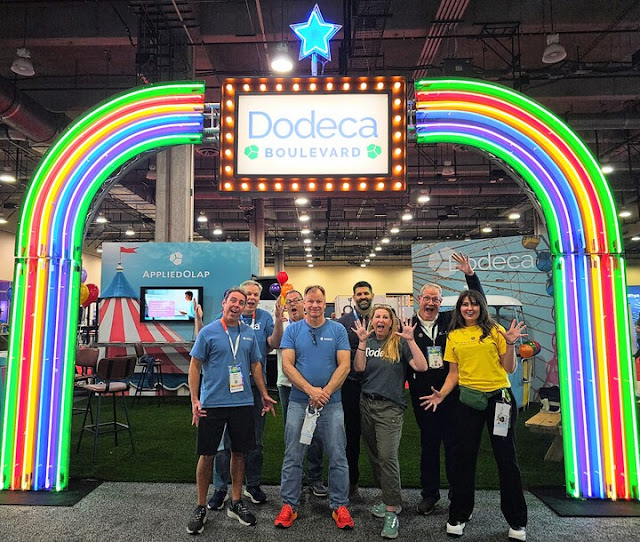
I just returned, wonderfully exhausted, from an incredible experience at Kscope25. What an amazing week in Grapevine, TX!


Sunday Symposiums

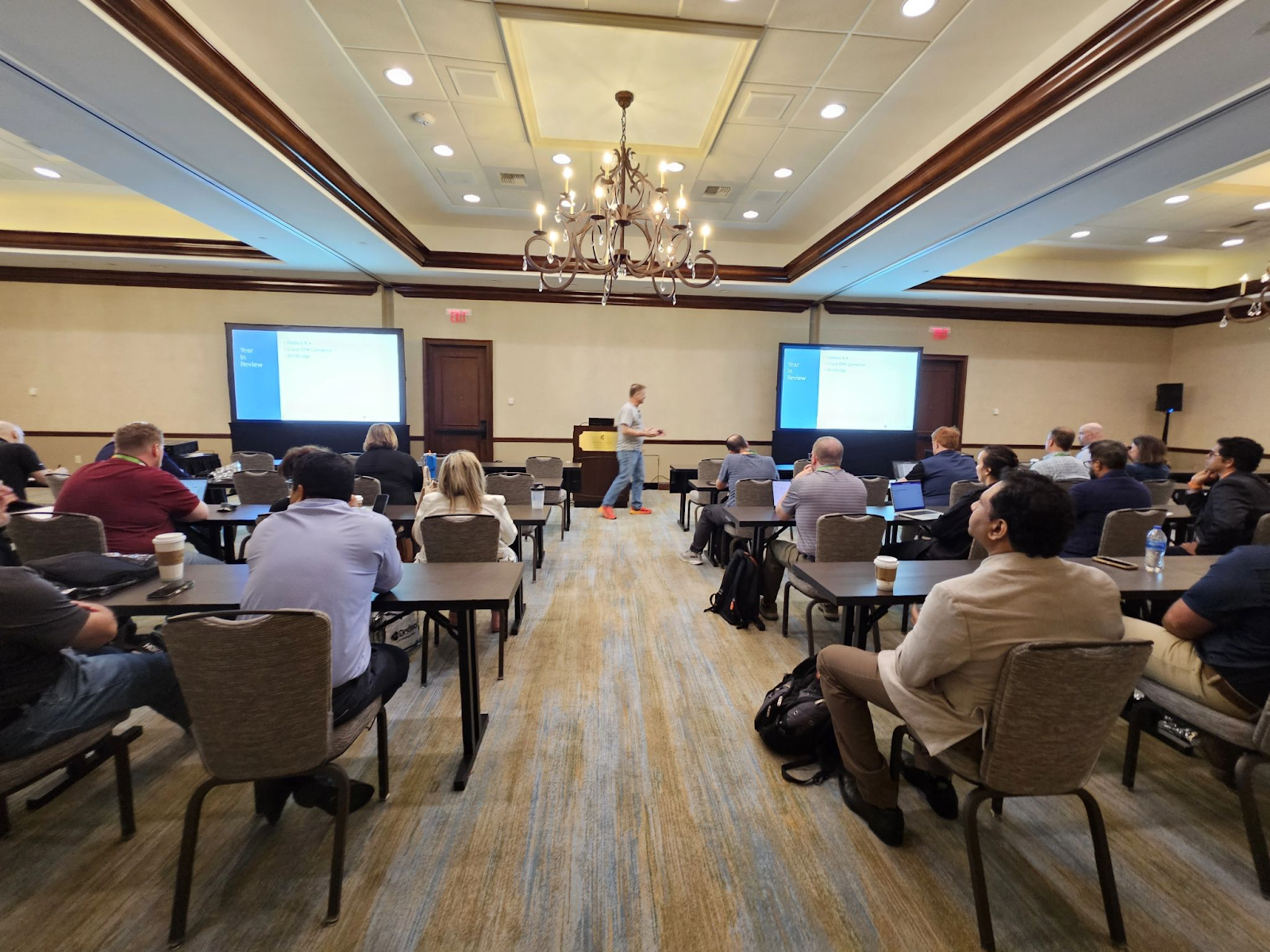
I kicked off my conference early on Sunday morning at the Essbase symposium. I was glad for the opportunity to meet Ekrem Soylemez in person after he gave his presentation. I'm excited that Essbase is going to get some energy from someone with many years of experience in the non-Essbase OLAP world. Ekrem covered federated partitions. This is the third consecutive Kscope where the Essbase symposium has focused on federated partitions therefore you can rest assured this is the direction. Federated Partition Essbase will eventually make its way to EPM Cloud. I'm glad they're finally moving to Essbase 21C by the end of this year as they're currently running on some 11.1.2.4 version that is (I can't believe I'm writing this) 10 years old!


I was a presenter at our Dodeca Symposium, demonstrating how to integrate EPM Cloud data with relational database details on the same grid. The hands-on lab for newcomers was equally rewarding. A highlight was Kroger's presentation about using Dodeca to enhance their Oracle FCCS and EPCM implementations, including automated report distribution and validation workflows. We were fortunate to have Edward Roske present about AI in our symposium. My key takeaway there is that the knowledge worker jobs in the future will be dominated by those who best know how to leverage AI.


Monday Community Event

The only reason I'm mentioning this is because my teams #Missing Integrity and Sparse Crowd won both the trivia contests!


Sessions

The conference's focus on AI integration was inspiring and unsurprising as it is the buzz word in just about every industry in the world right now. Connor McDonald's session on transitioning from database expert to AI newcomer really crystallized how real-world concepts translate into vectors. Jason Jones' "From Cubes to Cognition" opened my eyes to AI's potential in Essbase environments. I'm already envisioning AI applications for Dodeca in view creation and anomaly detection. Tim Tow's presentation on mastering spreadsheet efficiency highlighted practical approaches to efficiently automating business processes. It also highlighted the scary reality that spreadsheets are extremely error-prone.


Dodeca Customer Panel / Tuesday Night Event

I always love to hear our customers talking about how much they love Dodeca. They really, really love Dodeca. On Tuesday, leaders from Kroger, Mastercard, and GE Vernova shared how they’re using Dodeca as the engine behind their business operations. Later that night, we invited everyone to Old Hickory to enjoy a seafood and steak extravaganza. If you come to Kscope26, hit me up for an invitation as our Tuesday night event is not to be missed.


AI

It's all AI. Everything. It's going to touch everything and be integrated into every tool. It's going to increase productivity dramatically. It's going to impact our work and personal lives in ways we can not yet imagine. This transformation will be on the level of the industrial revolution, computers, and the internet. It feels like it might even be bigger.


EPM Cloud

I heard from so many Oracle customers who are implementing the entire EPM Cloud suite. I don't remember hearing that at previous conferences. It seems like the snowball rolling down the hill is unstoppable at this point. Recent earnings announcements from Oracle reinforce this.


Wednesday Night Event

It was a blast seeing everyone cut loose after a few days of intense learning. There was great energy in the Karaoke room and an awesome relaxed vibe on the back patio with artisanal whiskey and cigars. I thoroughly enjoyed seeing my first drone show and applaud the conference committee for pushing the envelope.


I hope to see everyone in Denver next summer. Make it a priority!

Wednesday, October 16, 2024

Filter Native Essbase ASO Exports

Essbase 21.6 was released in August. One of the enhancements was improved performance of ASO MDX Exports. In order to use this capability, add the DATAFORMATEXPORT directive to your Export statement. 

It's worth noting that this only works for exporting stored data: only Level 0 members and no calculated or formula members. This enhancement removes the limitation of 232 cells that was previously an issue for ASO MDX exports. If you previously had to break up MDX exports to get around this limit, this should fix that. Apparently it also adds support for duplicate member outlines. 

The example the documentation gives is super interesting because it includes a property, STORED_FLAG, that I don't recall ever seeing before. This property allows you to filter on stored members. The property isn't listed in the documented MDX Properties. I tried using it in some older Essbase versions and it did work so it's probably been available for a while.

Below is the example given in the documentation:
1:  EXPORT INTO FILE "MDXExport_DataExport1.txt" USING DATAEXPFORMAT  
2:  SELECT Filter([Measures].members, [Measures].currentmember.STORED_FLAG)  
3:  ON COLUMNS,   
4:  NON EMPTY(  
5:   Crossjoin(  
6:   Crossjoin(  
7:    Crossjoin(  
8:    Crossjoin(  
9:     Crossjoin(  
10:     Crossjoin(  
11:      Crossjoin(  
12:      Crossjoin(  
13:       Crossjoin(  
14:       Filter([Years].members, [Years].currentmember.STORED_FLAG),  
15:       Filter([Time].members, [Time].currentmember.STORED_FLAG)),  
16:      Filter([Transaction Type].members, [Transaction Type].currentmember.STORED_FLAG)),  
17:      Filter([Payment Type].members, [Payment Type].currentmember.STORED_FLAG)),  
18:     Filter([Promotions].members, [Promotions].currentmember.STORED_FLAG)),  
19:     Filter([Age].members, [Age].currentmember.STORED_FLAG)),  
20:    Filter([Income Level].members, [Income Level].currentmember.STORED_FLAG)),  
21:    Filter([Products].members, [Products].currentmember.STORED_FLAG)),  
22:   Filter([Stores].members, [Stores].currentmember.STORED_FLAG)),  
23:   Filter([Geography].members, [Geography].currentmember.STORED_FLAG))  
24:  )  
25:  ON ROWS FROM ASOSamp.Basic;  

Line 1: This begins the export command, specifies the output file and adds the new DATAEXPORTFORMAT directive.

Line 2: This begins the Select statement and specifies the column members which include all the stored Measures.

Line 4: Adds the NON EMPTY keyword. I believe this to be unnecessary. According to the documentation this will be assumed.

Lines 5-13: A disgusting list of nested Crossjoin functions. Oracle really needs to fix this. Microsoft MDX allows the joining of more than 2 sets in a single Crossjoin function call. This is an 11 dimension cube. One dimension will be in the columns and 10 on the rows. That means we need 9 Crossjoins. Gross. 

Lines 14-23: A filter statement on each line that returns only the stored members from the remaining dimensions.

Line 25: Ends the Export statement and specifies the cube from which we are exporting.

Here's a snippet of what you get back:

 "Original Price" "Price Paid" "Units" "Transactions" "Returns"  
 "Curr Year" "Jan" "Sale" "Cash" "No Promotion" "1 to 13 Years" "Under 20,000" "Camcorders" "017589" "14036" 656.5 656.5 1 2  
 "13681" 1443 1443 2 1  
 "Photo Printers" "14010" 232 232 1 2  
 "14027" 238 238 1 1  
 "13428" 214 214 1 2  
 "13681" 206 206 1 2 206  

If it looks oddly familiar, it is. This is the native Essbase export format. This new feature is the ability to filter native Essbase exports from ASO. If you want to only export a single year, or a handful of scenarios, you can do that.

It's great that we can do this now but what would really take this to the next level would be to export this ASO data in column format. I saw that on the roadmap at Kscope24 so hopefully we'll get that soon.

Monday, September 16, 2024

Complex PBCS ASO Procedural Calcs

The notion that one cannot write complex procedural calculations in ASO was disproved about 10 years ago. I spoke on the topic for the first time at Kscope15. Now that I'm getting more involved in PBCS, I wanted to see if my old tricks worked.

I'm going to attempt to use an MDX function in an ASO Custom Calc script. According to the documentation, this shouldn't work. Probably some of you have resorted to creating formula members that handle these functions and then call those members in your calculations. Let's see if we can get around that because, frankly, it's a pain. The less outline maintenance, the better.

My test case will be very simple. I'm going to copy data from account 4120 to 4130 but the twist here is that I'll bring in the prior month of data.


This task would be trivial in a BSO Calc.

First let's start off in Calc Manager with a calculation that copies the data for the current month.

1:  CustomCalcParameters parameters0 = new CustomCalcParameters()  
2:  parameters0.Pov = "Crossjoin(Crossjoin(Crossjoin(Crossjoin(Crossjoin(Crossjoin({[FY24]},{Descendants([Channel], [Channel].dimension.Levels(0))}),{Descendants([Entity], [Entity].dimension.Levels(0))}),{[Dec]}),{Descendants([Product], [Product].dimension.Levels(0))}),{Descendants([Scenario], [Scenario].dimension.Levels(0))}),{Descendants([Version], [Version].dimension.Levels(0))})"  
3:  parameters0.target = ""  
4:  parameters0.creditMember = ""  
5:  parameters0.debitMember = ""  
6:  parameters0.script = "([4130]) := ([4120]);"  
7:  parameters0.offset = ""  
8:  parameters0.sourceRegion = "{([4120])}"  
9:  operation.getApplication().getCube('Vis1ASO').executeAsoCustomCalculation(parameters0)  

For those creating one of these scripts the first time I'll give an overview of what the lines are doing. I'm going to leave out the lines with blank arguments.

Line 2 is the POV. Think of this like your BSO fix statement.

Line 6 is the script or the formula that you want to execute. In this case we're setting Account 4130 equal to 4120.

Line 8 is the source region. If it's not in the fix statement and we need to reference the data, we need to add it in here.

Lines 1 and 9 are groovy specific for executing the calc.

This particular calculation will result in the following:

But we need to get last month's data. Let's try putting an MDX function in Line 6.

 parameters0.script = "([4130]) := ([Period].CurrentMember.PrevMember,[4120]);"  

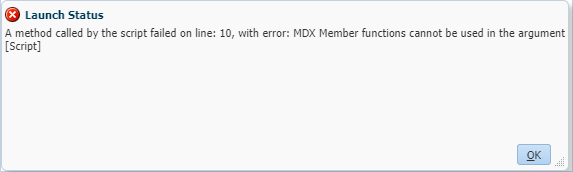
This change passes validation but when I execute it, I get an error. This tells me that the validation (probably) only cares about the groovy syntax here.


Is there any way around this? I'm going to dig into my bag of tricks and pull out one I've been using for many years with Essbase ASO cubes. Celvin Kattookaran taught me this, I don't know how he found out that it works, I don't even want to know. Anyway, if I put an IIF function on the right side of the formula, somehow it opens up the capability to use any and all MDX functions. Let's see if we can get that to work here.

 parameters0.script = "([4130]) := IIF(1=1,([Period].CurrentMember.PrevMember,[4120]),Missing);"  

My new line includes an IIF function that is set to 1=1 which will always be true. I'm including the Period in my tuple and using the Previous Member function on it.

When I execute the calculation, I get a different error.


This error indicates that our source region doesn't have that previous month in it. This tells me that I'm on the right track and the Essbase engine has begun using the MDX function. The fix for this is relatively simple. I need to add that period into my SourceRegion on line 8. I can either add November into the SourceRegion tuple or add all the months, assuming I'm going to run this for more than just December at some point.

 parameters0.sourceRegion = "Crossjoin({[4120]},{Descendants([Period], [Period].dimension.Levels(0))})"  

Once I changed that, the script ran perfectly.


I suppose a word of caution is in order here. While I've been using this method reliably for the better part of a decade, I'm not sure it's supported. I'm nearly certain it's not officially documented anywhere. But this might just get you out of a jam and maybe you can ditch BSO/Hybrid for good. 😀


Friday, July 19, 2024

Kscope24


I returned from Kscope24 in Nashville last night and wanted to shared a few thoughts about the conference.


Sunday Symposiums

The conference before the conference is a great way to get a feel for the trends in the EPM space. There was much talk about AI -- more on that later. The Essbase Symposium covered Federated Partitions and the Redwood interface in Essbase 21.6. If you're a customer with a large (slow) Essbase cube that needs real-time data loading, Oracle wants to work with you to test it out with Federated Partitions. Shoot me an email and I can put you in contact with the right people. Their goal is to get 10 referenceable customers within the next year.


Sessions

The technical sessions are the heart of Kscope. I'm really just coming up to speed on the EPM Cloud side of things so those were valuable to me. I attended a great session by Harsh Dave on the Enterprise Profitability and Cost Management tool. In it I realized that I basically built the homegrown version of this 10 years ago at Sears Holdings. It also cemented my belief that ASO is superior to BSO in just about every way possible. I can't believe how many times people mentioned block creation issues -- the same thing people were talking about 25 years ago when I started with Essbase. If you're serious about Essbase performance you should at least investigate ASO.


Dodeca Customer Panel

On Tuesday we had standing room only at the Dodeca Customer Panel. In it Kroger, LexisNexis, ADT and Principal talked about how they're leveraging Dodeca to run their business. All of them are using our new EPM Cloud connector to get the most of their EPM Cloud investment.


Groovy

There were 17 sessions with Groovy either in the title or the description. I get it, you need it to do your job due to limitations in EPM Cloud but it scares the heck out of me. Let me be clear, the syntax doesn't scare me (but avoid throwing 40 lines of code in a presentation slide, please). The fact that so many companies are writing hundreds, if not thousands of lines of custom Groovy code worries me tremendously. I'm afraid Groovy is the new VBA. The backlash of managers who got burned by having to deal with unmaintainable VBA is still going on to this day.


AI

There was much discussion of AI. It's the buzzword of the day. Very little of it impacts me... yet. I'm sure it will. Similar to the ubiquitous mentions of THE CLOUD a decade ago. Eventually it took hold and I'm sure AI will too. Most of what I saw isn't ready for the real world. 


Wednesday Night Event

We had a great time partying on a the General Jackson Showboat and Broadway. Kscope is a bit like drinking technical content from a firehose and the Wednesday night event is a great way to unwind. I probably ate and drank too much. Oh well...


GO!

If you were there this year, thank-you for helping making Kscope the best tech conference. If you weren't, start figuring out how you can be there next year. Start thinking of ideas for presentations. I'm available as a co-presenter if you need help. Do whatever you need to do to make sure you're in Grapevine for Kscope25.


Wednesday, July 10, 2024

Shared Member Problems in BSO Calcs

Shared members are an amazing feature of Essbase but they seem to always present challenges and many of those are not easy to spot.

A question arose on the Planning Cloud Customer Connect recently where the issue the poster was having was related to a shared member/alternate hierarchy. For some reason, it's never immediately apparent that this is the problem. Several people suggested a number of reasons before it dawned on me that a shared member was the culprit.

In a nutshell, they were requesting the parent of a shared member, expecting to get back the shared member's parent. However, they were getting back the protype's parent.

Suppose the following hierarchy:


If you had a calc script that was iterating through the level 0 members under Diet, and you requested the parent of each, you wouldn't get back the member name Diet. For 100-20 you'd get back 100, for 200-20 you'd get back 200 and for 300-30 you'd get back 300.

This problem shows up when you have a formula with something like the following:

@PARENT("Products")

Note: The @PARENT calculation function for Essbase returns the parent of the current member being calculated in the specified dimension.

The workaround the poster settled on was to add a new alias table and look up based upon that using the @ALIAS() function. It would be nice if there was a function, maybe @SPARENT(), that would return the parent of a shared member.

Update: I'm told that @SPARENT() does exist as an undocumented function. I tested the function and it returns the parent of the first instance of a shared member. If you need the second or greater instance, it seems, you're out of luck. Use at your own risk.


Thursday, June 27, 2024

Kscope24 Preview


In just over two weeks I'll be flying to Nashville for the best tech conference ever! I'm looking forward to catching up with friends and colleagues from around the world. The Denim & Diamonds event on Wednesday night looks like it will be a blast.

The conference will kick off early on Sunday morning with the Essbase Symposium. I'm hopeful that there will be some cool innovations as the Essbase space has been stagnant for a very long time now.

Following the Essbase session will be the Dodeca Symposium. Tim Tow will be sharing our roadmap and his vision for the future of the product. We've been heavily investing in our EPM Cloud Connector and will be showing that off. If you use EPM Cloud, you'll want to stop by and see what we've been up to.

I've been reviewing the session agenda and picked out three sessions that I'm most looking forward to attending. All three are fantastic speakers and respected experts in their field.

Monday July 15, 4:00 pm - 5:00 pm
Joe Aultman -- Converting an Excel Model into Planning -- A New Approach

Tuesday July 16, 4:00 pm - 5:00 pm
Peter Nitschke -- Form Fundamentals: From Zero to Planning Hero

Wednesday July 17, 1:30 pm - 2:30 pm
Jake Turrell -- From Manual to Magical: Transforming Oracle EPM with PowerShell Automation

Be sure to stop by the Applied OLAP booth to say hello. I look forward to meeting many new people this year. Safe travels...

Monday, June 24, 2024

EPM Cloud Planning Smart Lists

The Backstory:

I never had much use for Smart Lists in Essbase. I remember people asking for the functionality since I started working with Essbase in 1998. Here's a post from the Essbase Network 54 Board in 2000 essentially asking for this capability.


They finally got around to adding "Typed Measures" to Essbase somewhere around 2007. Here's a link to Tim Tow blogging about them in 2008.


A Basic Primer on Smart Lists:

Essbase stores numerical data, specifically 8-byte floating point numbers. Essbase is what Planning/PBCS/EPM Cloud Cubes use to store data. As a work-around to store some text, you can create a list of text values, assign them some numerical value and store that in the database. The application layer then interprets those values as text using the Smart List.


Some Use Cases:

Displaying some status for an Account/Entity/Product/etc.

Displaying the hire month for an employee.

You want an indicator for a member but don't want to create an Attribute dimension.

You want to show text in the numeric area of a report.


How to Create a Smart List in EPM Cloud Planning:

Step 1: Create a Smart List

Find the Create and Manage menu and select Smart Lists.


Press the + sign to add a new Smart List.

Now name your Smart List and decide on options. In this case the Label will be Status. Any missing values will show as Active by default.

Click on the Entries tab and edit your list of values. The Name needs to be alphanumeric and contain no spaces but the Label can contain spaces. Once this is complete, save the Smart List.


Step 2: Update The Outline

Navigate to the Create and Manage menu and select Dimensions.
Add a new member in a dimension and change its Data Type to SmartList. Then set the Smart List value. In this case I added a member in the Account dimension called Entity Status and assigned it the Status Smart List.


Before leaving the Dimensions editor, click on the Evaluation Order tab. This setting tells the application how to resolve conflicts if you have Smart Lists in multiple dimensions. You will need to select the dimension in which your Smart List resides and Save this setting. 

Once the dimension change is saved, be sure to refresh your database.

Step 3: Test Your Change in Smart View

Now you can go into Smart View and retrieve some data to see the Smart List working.

When you click on a cell, you'll get a drop-down box allowing you to change the cell's value. You can write this back to the database.

Good luck using Smart Lists! Let me know the creative ways you're using this feature.

Thursday, June 13, 2024

EPM Cloud ASO Plan Type Procedural Calcs

When learning EPM Cloud Planning, I went through a class that taught me you cannot perform ASO procedural calculations. I didn't like to hear I had to give up something so vital to Essbase ASO. While it's kind of true, I'll show you a work-around.

For an in-depth explanation of the problem, see this really old blog post HERE. In short, summing formula members across other dimensions is really, really difficult. The work-around is to run a procedural calc at level-0 thus storing the data. Then you let ASO do it's aggregation magic.

It's surprisingly easy in EPM Cloud Planning ASO Plan Types.

Step 1: Put the formula into a member.

If you're creating a bunch of calcs, I'd recommend putting these members in a hidden section of the hierarchy. For this example, I created a member in my Account dimension with two members under it.


On the ProcTestSource I put a very simple member formula of the number 9999. I'll get into more complex formulas in future posts.


Step 2: Create a business rule to run an allocation on the ASO cube.


For the formula, I put the Target on the left side and the Source on the right.


Now I run the business rule and retrieve my data in Smart View (or Dodeca). The column on the left is a formula that will evaluate to 9999 at every intersection. The column on the right has the stored value at level 0 and lets ASO handle the aggregations.


If you've got a better way of doing this, please reach out to me. I'm curious to see if there are other ways to accomplish this (other than doing the calculation in a BSO cube and moving the data over).

Wednesday, June 5, 2024

Change-Up

It's been over 3 years since I last posted on this blog. It's not because I haven't wanted to post, it's because there really haven't been many (any?) significant changes in the Essbase world worth blogging about. Is it because Essbase is dead? I check the Google search trends for essbase and see this:


It is a little troubling to see this as one who has been developing Essbase applications since 1998 -- a full six years before this chart even begins. But it isn't that Essbase is dead, far from it. Essbase is just behind the scenes now. It's the engine behind some of the most powerful and successful cloud applications on the planet. It's time for me to embrace that fact and learn all there is to know about Oracle EPM Cloud.

My goal is to now post regularly about this "New Essbase". I work for Applied OLAP so expect Dodeca and Drillbridge content to be sprinkled in as well. See you next time.

Friday, April 2, 2021

Essbase Shadow Cubes Introduction


The idea for Essbase shadow cubes has probably been around as long as Essbase has existed in a production environment. Essbase is an OLAP tool -- two of the letters stand for "On Line" meaning it's probably pretty important. When you apply changes to an Essbase outline, that cube is no longer on line. Kind of a downer for an OLAP tool. So people invented clever ways of making copies of a cube, updating the cube and then redirecting users to the updated cube. All the while trying to minimize what could be an hours long process. Shadow Cubes minimize the effort involved. 


Here's an overview of the shadow cube process.

1. Create a shadow cube.

This is currently only done using the REST API. If we could do this with, say, MaxL then this would probably be a single post. Instead I'm going to delve into the REST API as a part of this, hopefully not too long, series.

2. Make whatever changes you want to the shadow cube.

Since you're not touching the cube users are connected to you can do whatever you want here. You can go into the Jet UI (or EAS Lite) and make changes. You can load data, run calculations, update outlines. There are a few exceptions but you can pretty much do whatever you want here and use whatever tool you want, not just the REST API.

3. Promote the shadow cube.

Also currently only done using the REST API. If your changes don't go so well then another option here is to discard the shadow cube. So in one regard Oracle made this really easy to do. In another regard they made it nearly impossible for someone who knows nothing about the REST API. So consider this an opportunity to learn a new skill. It's not that hard, trust me.


Some important notes:

  • Users can query data while the shadow cube is there. They cannot load data or run calculations.

  • There is a brief outage during the time the shadow cube is promoted. How long is that? I would wager it depends on your infrastructure and the size of the cube. More experimentation is needed. In my tests using shadow cubes in Smart View, the user doesn't lose their connection during the promotion process. So it's possible many users will be unaware that the promotion has taken place. You might need to tell them in some ingenious way. Hopefully you put a timestamp somewhere in your cube. If you don't, you probably should.

  • This is only available in Essbase 21c. It doesn't appear to be in the 19c documentation but you're probably not on that version anyway. It's definitely not available in 11.1.2.4. (You should start planning to upgrade to Essbase 21c if you haven't already.)

  • Don't make infrastructure changes to the shadow cube. Don't do things like change names of applications or databases. Don't make partition changes. Don't make security changes. Here's what the official documentation says: During a promotion, all security layer associations on the destination application, such as users, groups, and security filters, are retained, while that of shadow/source are lost. The same rule applies for partition definitions.


My next post will be an introduction to the REST API for Essbase.

Tuesday, December 15, 2020

New Essbase On-Prem Version Is Now Available!


For the first time in almost six years, there's a new on-prem release of Essbase available. I'm calling it on-prem but Essbase 21c is the same version whether you run it in Oracle's cloud, somebody else's cloud or your own Linux box. (Click here to see which distribution versions are supported) This is an exciting day! I've already had a chance to kick the tires and I'm really excited about the performance improvements I've been seeing.

As always, Applied OLAP is ready for Dodeca to attach to the latest versions of Essbase. We're happy to set up a demo of Dodeca and Essbase 21c for those who are curious -- just shoot us a message.

Release notes are available here and the installation file is available on Oracle's eDelivery website.

Enjoy!


Monday, October 26, 2020

Essbase MDX Exports

I delivered a presentation last week at the most excellent Hyperion Solutions 2020 on the topic of Essbase MDX. In it I walked the audience through the evolution of Essbase MDX exports. This is a summary of that section. Be sure to read until the very end as there is an update since the presentation.


Generation 1: The Ugly

In the first generation, if you wanted to export data during batch using MaxL the output was nearly unusable. I had to write a parser in Perl to get the output I needed.

Here's the code:

 1
 2
 3
 4
 5
 6
 7
 8
 9
10
11
spool on to 'gen1.txt';

select {[Mar],[Apr]} on columns,
{[300],[400]} dimension properties
level_number, member_unique_name on rows,
crossjoin({[Actual],[Budget]},
{[Opening Inventory],[Ending Inventory]})
dimension properties level_number, member_unique_name on pages
from [Sample].[Basic];

spool off;

Below is my actual output file. I mean, seriously, what am I supposed to do with this?

MAXL> select {[Mar],[Apr]} on columns,

   2>

   3> {[300],[400]} dimension properties

   4>

   5> level_number, member_unique_name on rows,

   6>

   7> crossjoin({[Actual],[Budget]},

   8>

   9> {[Opening Inventory],[Ending Inventory]})

  10>

  11> dimension properties level_number, member_unique_name on pages

  12>

  13> from [Sample].[Basic];


 Axis-2              Axis-2.properties   Axis-1              Axis-1.properties   (Mar)               (Apr)

+-------------------+-------------------+-------------------+-------------------+-------------------+-------------------

 (Actual, Opening In (LEVEL_NUMBER = 0,  (Cream Soda)        (LEVEL_NUMBER = 1,                29095               30334

 (Actual, Opening In (LEVEL_NUMBER = 0,  (Fruit Soda)        (LEVEL_NUMBER = 1,                26409               27588

 (Actual, Ending Inv (LEVEL_NUMBER = 0,  (Cream Soda)        (LEVEL_NUMBER = 1,                30334               32266

 (Actual, Ending Inv (LEVEL_NUMBER = 0,  (Fruit Soda)        (LEVEL_NUMBER = 1,                27588               29550

 (Budget, Opening In (LEVEL_NUMBER = 0,  (Cream Soda)        (LEVEL_NUMBER = 1,                27380               28460

 (Budget, Opening In (LEVEL_NUMBER = 0,  (Fruit Soda)        (LEVEL_NUMBER = 1,                27230               29030

 (Budget, Ending Inv (LEVEL_NUMBER = 0,  (Cream Soda)        (LEVEL_NUMBER = 1,                28460               30190

 (Budget, Ending Inv (LEVEL_NUMBER = 0,  (Fruit Soda)        (LEVEL_NUMBER = 1,                29030               31520


 OK/INFO - 1241150 - MDX Query execution completed.


MAXL>

Generation 2: The Bad

With Essbase 11.1.2.4.010 I could specify an output delimiter which made things far better. The column_seperator command was supposed to solve all of my problems.

Here's the code:

 1
 2
 3
 4
 5
 6
 7
 8
 9
10
11
12
set column_separator "|";
spool on to 'gen2.txt';

select {[Mar],[Apr]} on columns,
{[300],[400]} dimension properties
level_number, member_unique_name on rows,
crossjoin({[Actual],[Budget]},
{[Opening Inventory],[Ending Inventory]})
dimension properties level_number, member_unique_name on pages
from [Sample].[Basic];

spool off;

The output was better but not perfect. I still have to deal with the commands being written to the file.

MAXL> select {[Mar],[Apr]} on columns,

   2> {[300],[400]} dimension properties

   3> level_number, member_unique_name on rows,

   4> crossjoin({[Actual],[Budget]},

   5> {[Opening Inventory],[Ending Inventory]})

   6> dimension properties level_number, member_unique_name on pages

   7> from [Sample].[Basic];


Scenario|Measures|Scenario.LEVEL_NUMBE|Product|Product.LEVEL_NUMBER|Mar|Apr

Actual|Opening Inve|0|Actual|0|Opening |Cream Soda|1|300|29095|30334

Actual|Opening Inve|0|Actual|0|Opening |Fruit Soda|1|400|26409|27588

Actual|Ending Inven|0|Actual|0|Ending I|Cream Soda|1|300|30334|32266

Actual|Ending Inven|0|Actual|0|Ending I|Fruit Soda|1|400|27588|29550

Budget|Opening Inve|0|Budget|0|Opening |Cream Soda|1|300|27380|28460

Budget|Opening Inve|0|Budget|0|Opening |Fruit Soda|1|400|27230|29030

Budget|Ending Inven|0|Budget|0|Ending I|Cream Soda|1|300|28460|30190

Budget|Ending Inven|0|Budget|0|Ending I|Fruit Soda|1|400|29030|31520


 OK/INFO - 1241150 - MDX Query execution completed.


MAXL> spool off;


Generation 3: The Good

The next iteration, only available in Essbase 19c or higher, is what should have been available in the first place.

Here's the new code. Notice the first line where I can now specify the export file name and the delimiter. Nirvana...

1
2
3
4
5
6
7
8
EXPORT INTO FILE "Gen3" OVERWRITE USING COLUMNDELIMITER "|"
select {[Mar],[Apr]} on columns,
{[300],[400]} dimension properties
level_number, member_unique_name on rows,
crossjoin({[Actual],[Budget]},
{[Opening Inventory],[Ending Inventory]})
dimension properties level_number, member_unique_name on pages
from [Sample].[Basic];

Here's the file output:

Scenario|Measures|Scenario.LEVEL_NUMBER|Scenario.MEMBER_UNIQUE_NAME|Measures.LEVEL_NUMBER|Measures.MEMBER_UNIQUE_NAME|Product|Product.LEVEL_NUMBER|Product.MEMBER_UNIQUE_NAME|Mar|Apr

Actual|Opening Inventory|0|Actual|0|Opening Inventory|Cream Soda|1|300|29095|30334

Actual|Opening Inventory|0|Actual|0|Opening Inventory|Fruit Soda|1|400|26409|27588

Actual|Ending Inventory|0|Actual|0|Ending Inventory|Cream Soda|1|300|30334|32266

Actual|Ending Inventory|0|Actual|0|Ending Inventory|Fruit Soda|1|400|27588|29550

Budget|Opening Inventory|0|Budget|0|Opening Inventory|Cream Soda|1|300|27380|28460

Budget|Opening Inventory|0|Budget|0|Opening Inventory|Fruit Soda|1|400|27230|29030

Budget|Ending Inventory|0|Budget|0|Ending Inventory|Cream Soda|1|300|28460|30190

Budget|Ending Inventory|0|Budget|0|Ending Inventory|Fruit Soda|1|400|29030|31520

Generation 2 Part 2:

This is the plot twist and the part that I did not cover in my presentation. In reading through the release notes, I noticed there's a new command which became available in 11.1.2.4.018. It allows you to turn off the echo of statements in the spooled file. It does appear that you can get a clean MDX export in 11.1.2.4 (as long as you're on patch 18 or higher). The other thing I noticed is that I only got clean output in my export file if I was running the script in non-interactive mode. If I manually logged in using the MaxL command line interface and tried running this, I'd still get the unwanted statements in my output file.

Here's the code:

 1
 2
 3
 4
 5
 6
 7
 8
 9
10
11
12
13
14
set message level warning;
set column_separator "|";
set echo_mode off;
spool on to 'Gen2p2.txt';

select {[Mar],[Apr]} on columns,
{[300],[400]} dimension properties
level_number, member_unique_name on rows,
crossjoin({[Actual],[Budget]},
{[Opening Inventory],[Ending Inventory]})
dimension properties level_number, member_unique_name on pages
from [Sample].[Basic];

spool off;


Here's the file output:

Scenario|Measures|Scenario.LEVEL_NUMBER|Scenario.MEMBER_UNIQUE_NAME|Measures.LEVEL_NUMBER|Measures.MEMBER_UNIQUE_NAME|Pr

oduct|Product.LEVEL_NUMBER|Product.MEMBER_UNIQUE_NAME|Mar|Apr

Actual|Opening Inventory|0|Actual|0|Opening Inventory|Cream Soda|1|300|29095|30334

Actual|Opening Inventory|0|Actual|0|Opening Inventory|Fruit Soda|1|400|26409|27588

Actual|Ending Inventory|0|Actual|0|Ending Inventory|Cream Soda|1|300|30334|32266

Actual|Ending Inventory|0|Actual|0|Ending Inventory|Fruit Soda|1|400|27588|29550

Budget|Opening Inventory|0|Budget|0|Opening Inventory|Cream Soda|1|300|27380|28460

Budget|Opening Inventory|0|Budget|0|Opening Inventory|Fruit Soda|1|400|27230|29030

Budget|Ending Inventory|0|Budget|0|Ending Inventory|Cream Soda|1|300|28460|30190

Budget|Ending Inventory|0|Budget|0|Ending Inventory|Fruit Soda|1|400|29030|31520
Wednesday, May 13, 2020
Federated Partitions in Essbase

In this post I'm going to try to explain what a Federated Partition is in the Essbase world, how to create one and then I'll throw in some speculation about them just for fun.

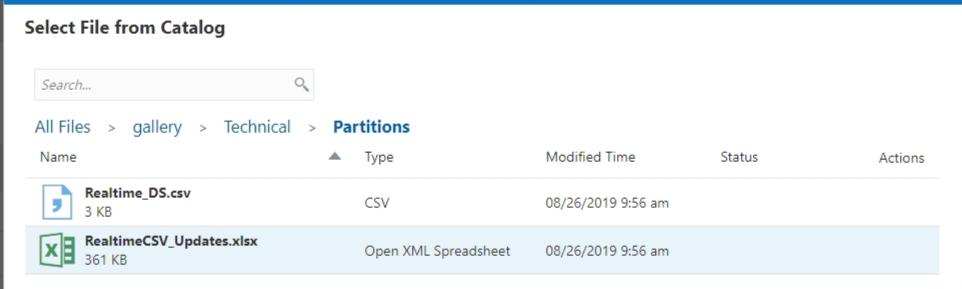
So what exactly is a Federated Partition? I can find no documentation on them (with the exception of the RealtimeCSV_Updates.xlsx file in the Cloud Gallery). They were briefly presented by Oracle at Kscope19. My only understanding comes from trying to set them up and speaking directly with Oracle product management.

Very simply put they are transparent partitions to either relational databases or flat files. The data is not stored in Essbase, it remains in the source. "Realtime Partitions" is how they were presented at Kscope19.

This architecture has a number of ramifications I'm sure. The word "fast" does not come to mind but the jury is still out.

Now I'll walk through creating one in Essbase 19c. I tried getting this to work in OAC back when OAC meant Essbase Cloud but ran into many issues and was not successful. This is going to be a very simple example using a flat file source. When the data in that flat file changes, the data in Essbase will change -- like magic. Yeah, mind blown, I know, let's get started...


Create the Cube and Partition 

Essbase 19c comes with a gallery of applications well beyond Sample Basic. The one designed to demonstrate Federated Partitions is called RealtimeCSV.


Import the cube from the Gallery.
image

Select the RealtimeCSV_Updates.xlsx file which contains everything Essbase needs to build the cube.
image

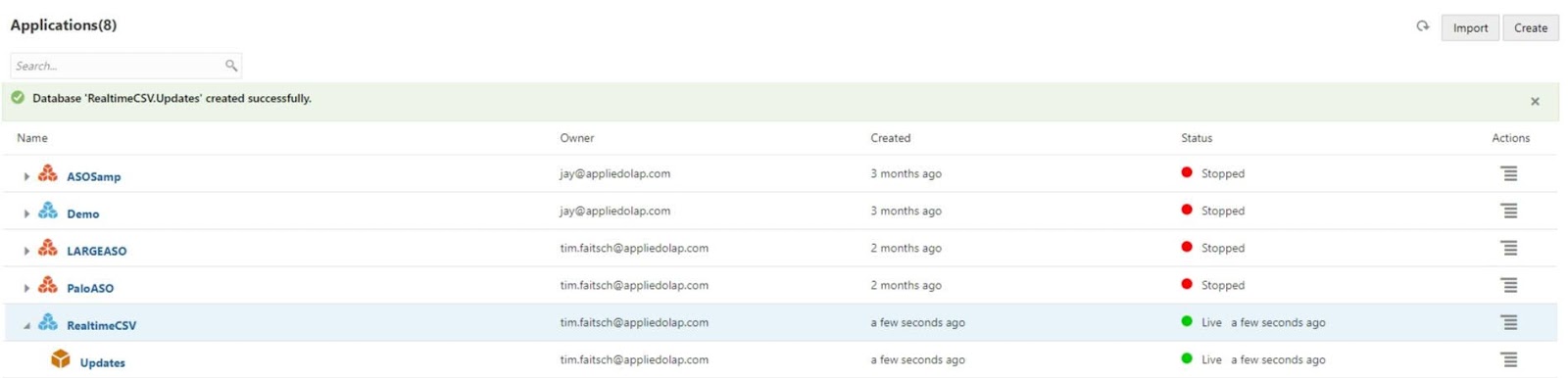
Now I can see cube in my list of applications.
image

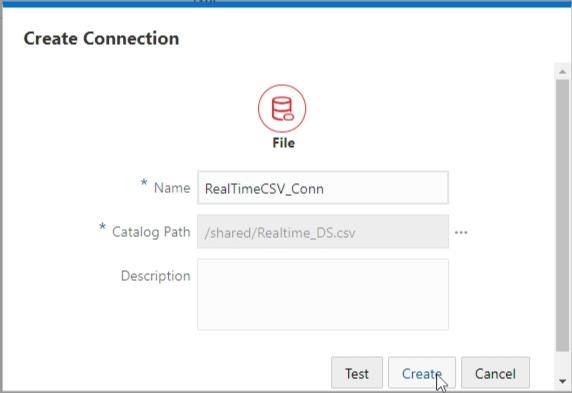
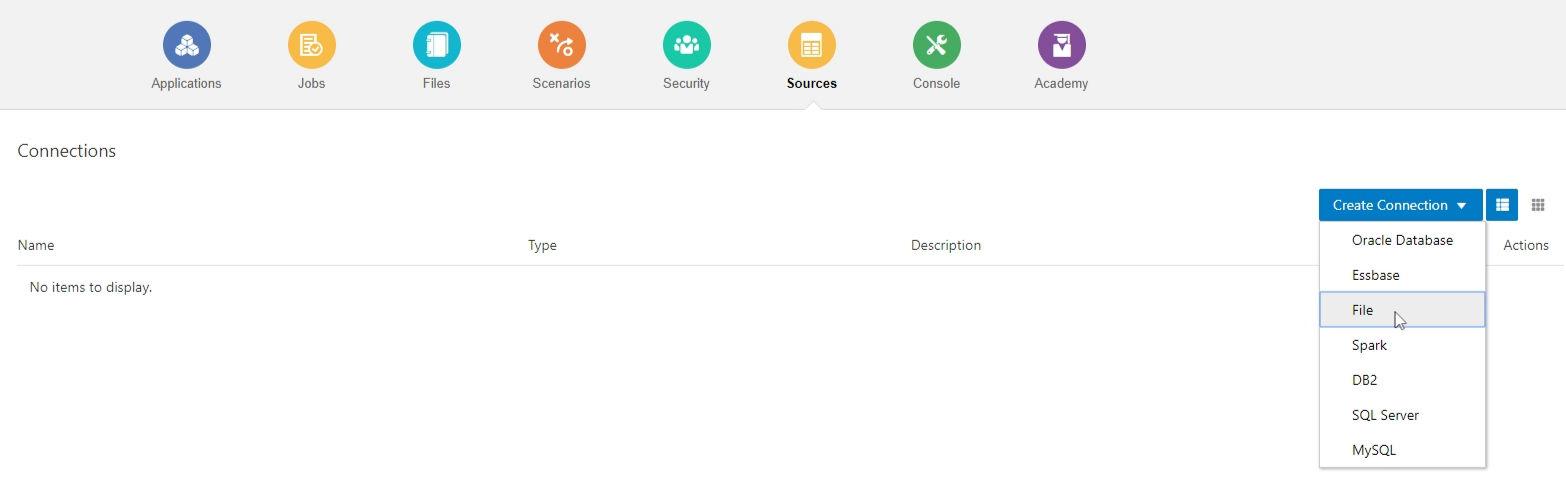
Under Sources, I select Create Connection and File.
image

I named my connection RealTimeCSV_Conn and selected the Realtime_DS.csv file from the shared folder on the cloud. Since you cannot update the files in the Gallery, I made a copy of the Realtime_DS.csv file which will allow me to update it.
image

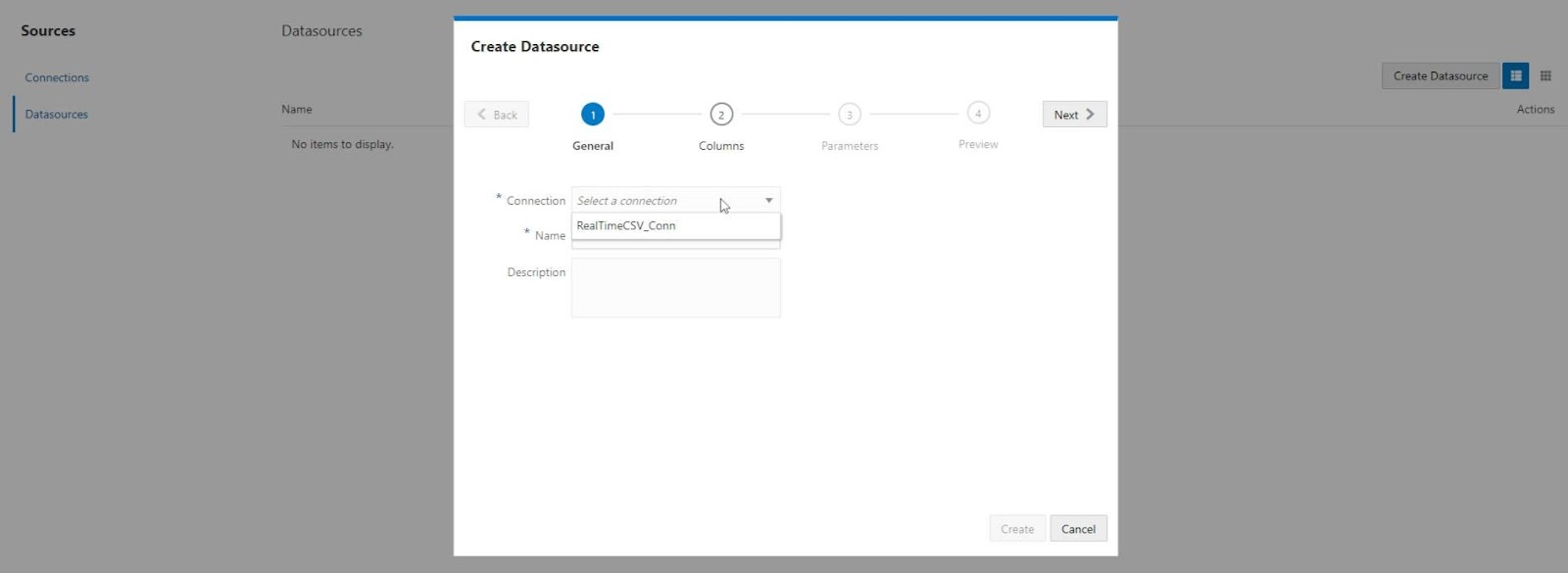
Next I selected Datasources and Create Datasource. Then I chose the Connection I just created.
image

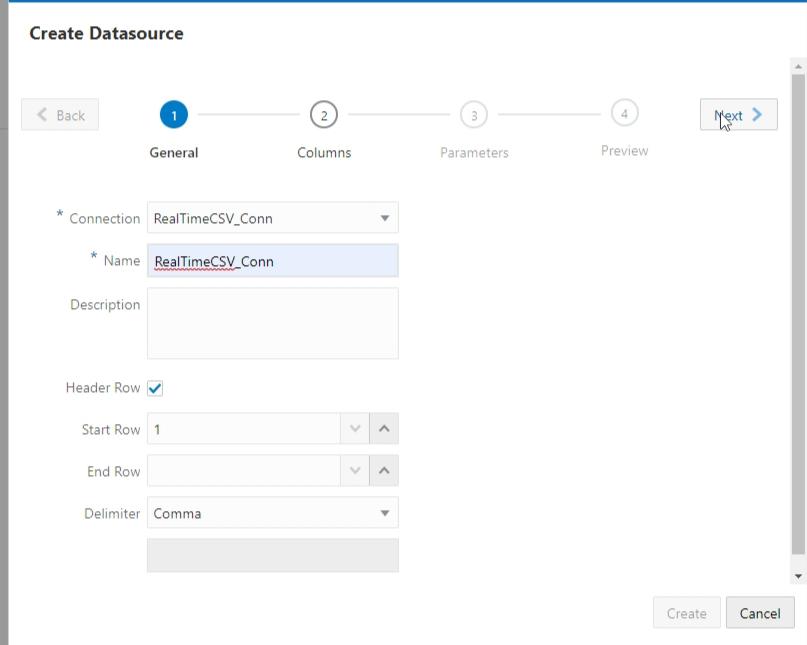
I named the Datasource RealtimeCSV_Conn and clicked Next.
image

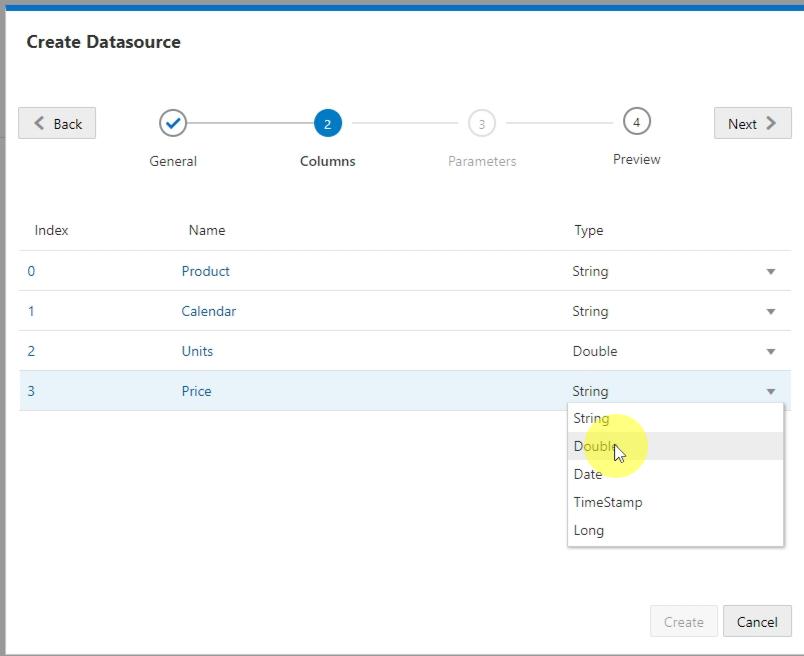
I changed the Units and Price column to have the Double type. Then clicked Next.
image

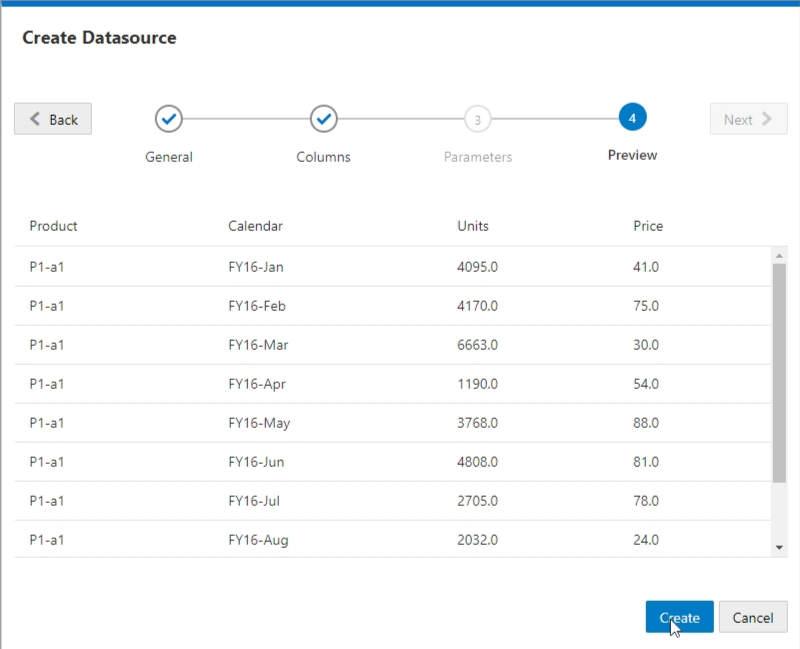
Finally I was prompted with a Preview of my data and I clicked Create.
image

Next I clicked on the Areas tab. From there I clicked the Add Area button and entered my Target Area using Essbase functions and member names.
I then clicked the Validate button followed by the Save and Close button.


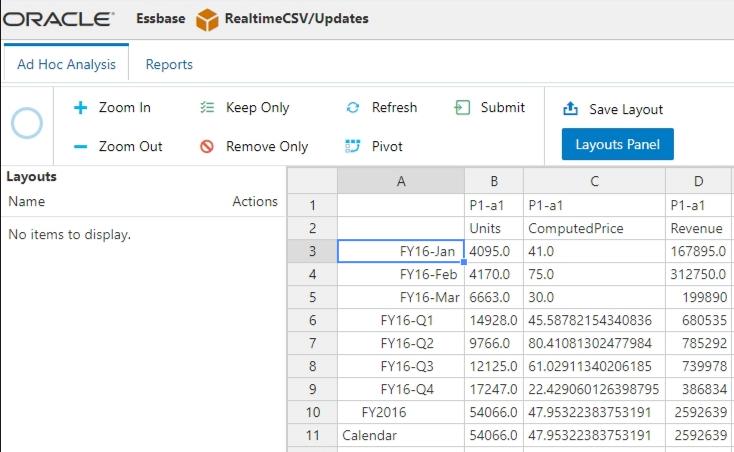
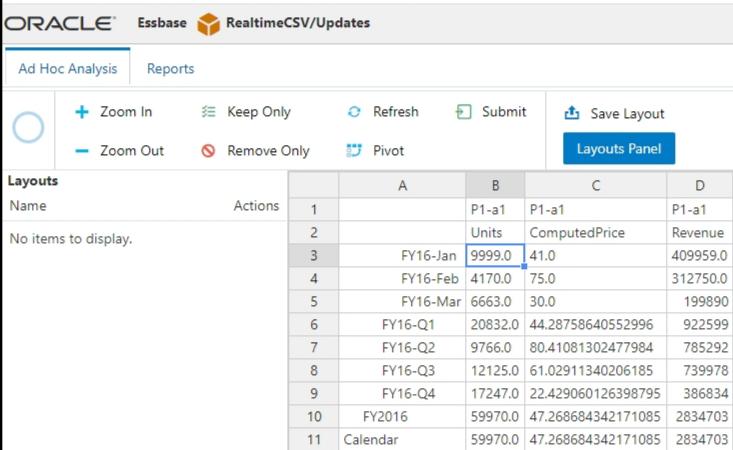
I then went to pull in some data to test the cube. The data is coming into this cube in real time.
image

Finally, I went back and updated the csv file with some different numbers. I refreshed my data and the changes were reflected.
image


Just to prove what's going on here, I'll show you the database storage statistics. You can see that there are no blocks and no pag or ind files.


Speculating Wildly

So what does this all mean? Why would Oracle be spending time on a feature like this? All of this is speculation influenced by comments I've heard from product managers over the past year...

Oracle is a database company. They make a really powerful database that runs a significant portion of the world. Wouldn't it be really cool if they could scrap page and index files altogether and just have their relational database store all of the level 0 Essbase data? Well that's what this is. Right now. Slap hybrid calculations on top and you have real-time updates to your cube. No loads, no calcs.
It always comes down to performance. This cube is three dimensions. It's got training wheels and makes Sample Basic look complicated. I'll remain skeptical, outside of small use cases, until I see large cubes using Federated Partitions with sizable data sources. In the meantime it's another tool in the toolbox. Drop me a line if you start using it in a production environment.


Disclaimer

I urge extreme caution in trying to use Federated Partitions. Keep in mind that Oracle has probably not documented them for a reason. For now I would recommend using traditional techniques for loading data into a cube.