Showing posts with label Cloud. Show all posts

Tuesday, December 15, 2020

New Essbase On-Prem Version Is Now Available!


For the first time in almost six years, there's a new on-prem release of Essbase available. I'm calling it on-prem but Essbase 21c is the same version whether you run it in Oracle's cloud, somebody else's cloud or your own Linux box. (Click here to see which distribution versions are supported) This is an exciting day! I've already had a chance to kick the tires and I'm really excited about the performance improvements I've been seeing.

As always, Applied OLAP is ready for Dodeca to attach to the latest versions of Essbase. We're happy to set up a demo of Dodeca and Essbase 21c for those who are curious -- just shoot us a message.

Release notes are available here and the installation file is available on Oracle's eDelivery website.

Enjoy!


Wednesday, May 13, 2020

Federated Partitions in Essbase

In this post I'm going to try to explain what a Federated Partition is in the Essbase world, how to create one and then I'll throw in some speculation about them just for fun.

So what exactly is a Federated Partition? I can find no documentation on them (with the exception of the RealtimeCSV_Updates.xlsx file in the Cloud Gallery). They were briefly presented by Oracle at Kscope19. My only understanding comes from trying to set them up and speaking directly with Oracle product management.

Very simply put they are transparent partitions to either relational databases or flat files. The data is not stored in Essbase, it remains in the source. "Realtime Partitions" is how they were presented at Kscope19.

This architecture has a number of ramifications I'm sure. The word "fast" does not come to mind but the jury is still out.

Now I'll walk through creating one in Essbase 19c. I tried getting this to work in OAC back when OAC meant Essbase Cloud but ran into many issues and was not successful. This is going to be a very simple example using a flat file source. When the data in that flat file changes, the data in Essbase will change -- like magic. Yeah, mind blown, I know, let's get started...


Create the Cube and Partition 

Essbase 19c comes with a gallery of applications well beyond Sample Basic. The one designed to demonstrate Federated Partitions is called RealtimeCSV.


Import the cube from the Gallery.
image

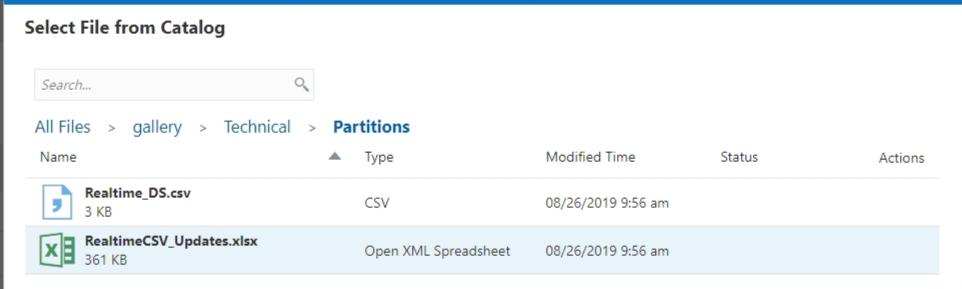
Select the RealtimeCSV_Updates.xlsx file which contains everything Essbase needs to build the cube.
image

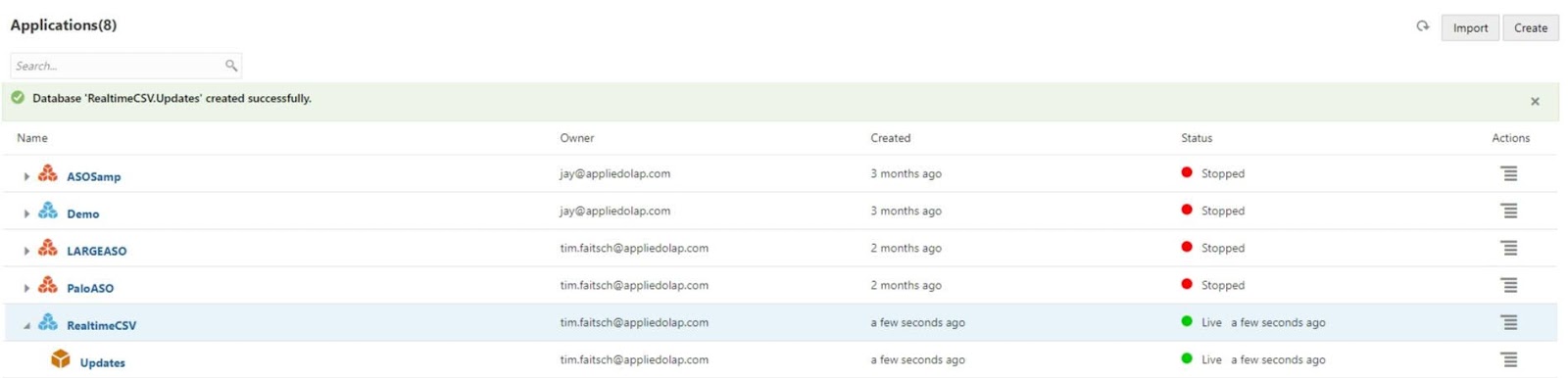
Now I can see cube in my list of applications.
image

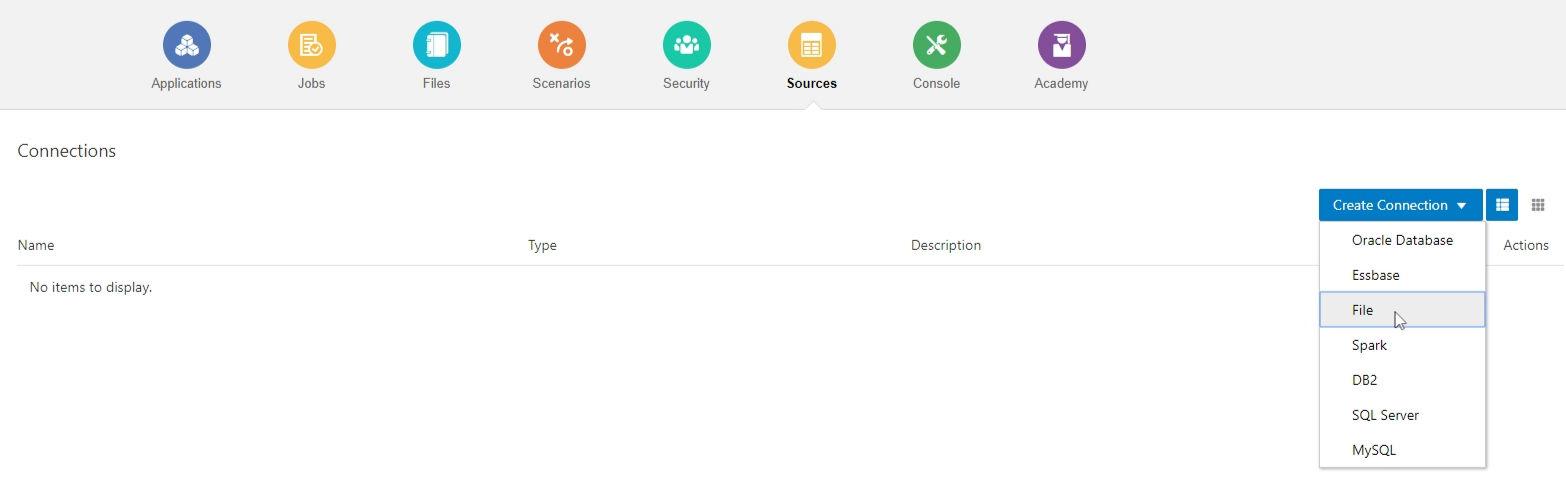
Under Sources, I select Create Connection and File.
image

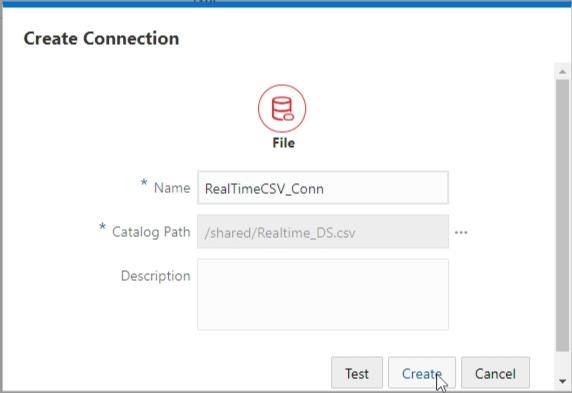
I named my connection RealTimeCSV_Conn and selected the Realtime_DS.csv file from the shared folder on the cloud. Since you cannot update the files in the Gallery, I made a copy of the Realtime_DS.csv file which will allow me to update it.
image

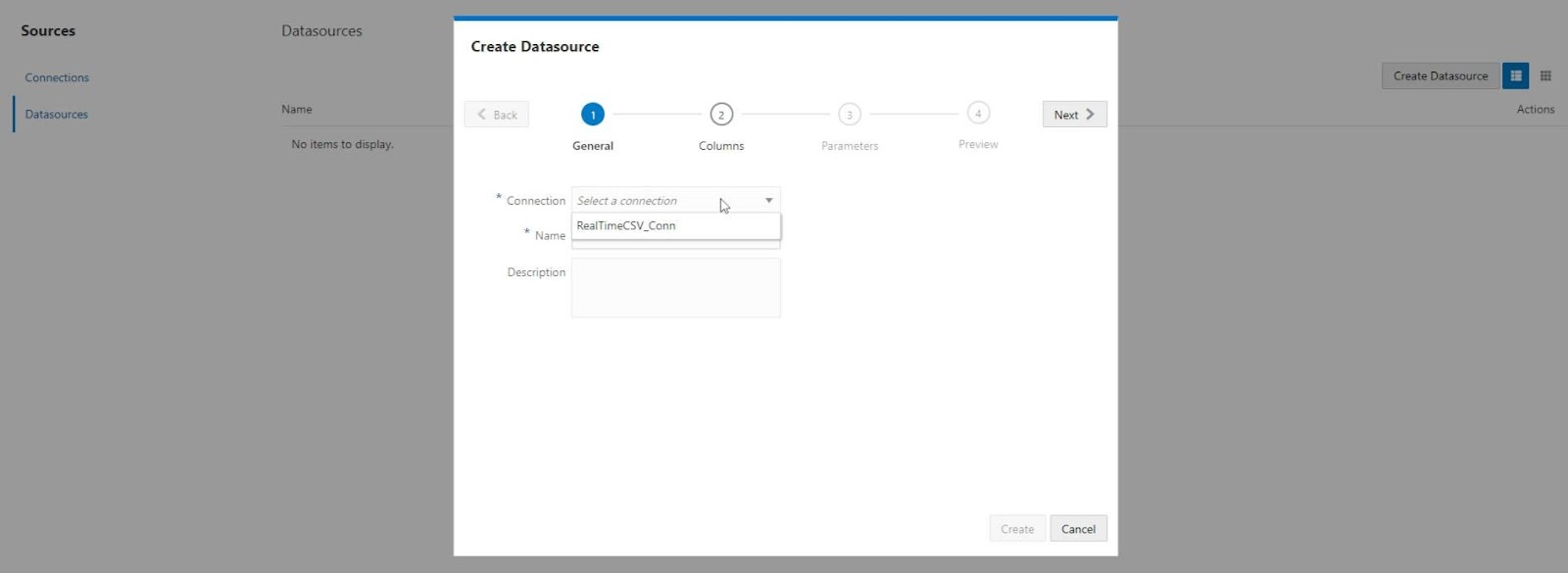
Next I selected Datasources and Create Datasource. Then I chose the Connection I just created.
image

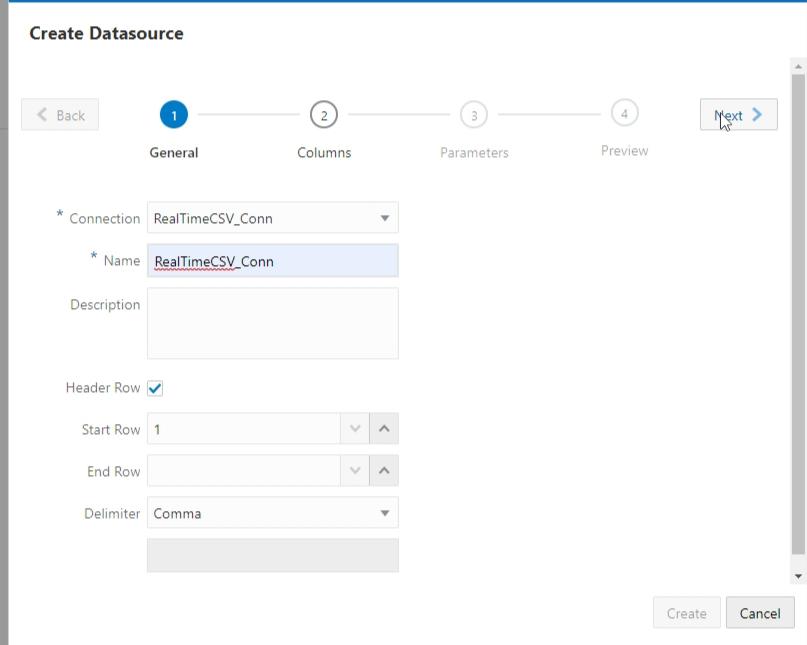
I named the Datasource RealtimeCSV_Conn and clicked Next.
image

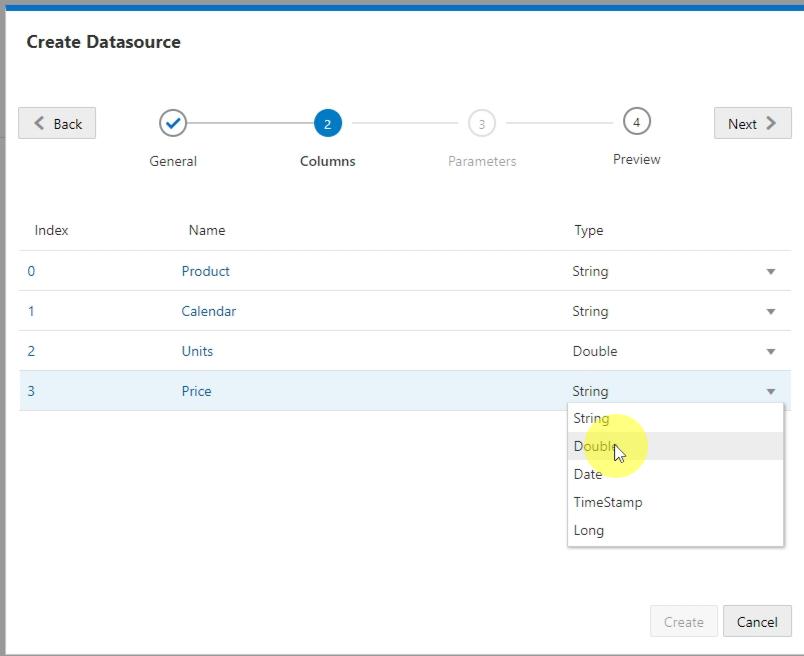
I changed the Units and Price column to have the Double type. Then clicked Next.
image

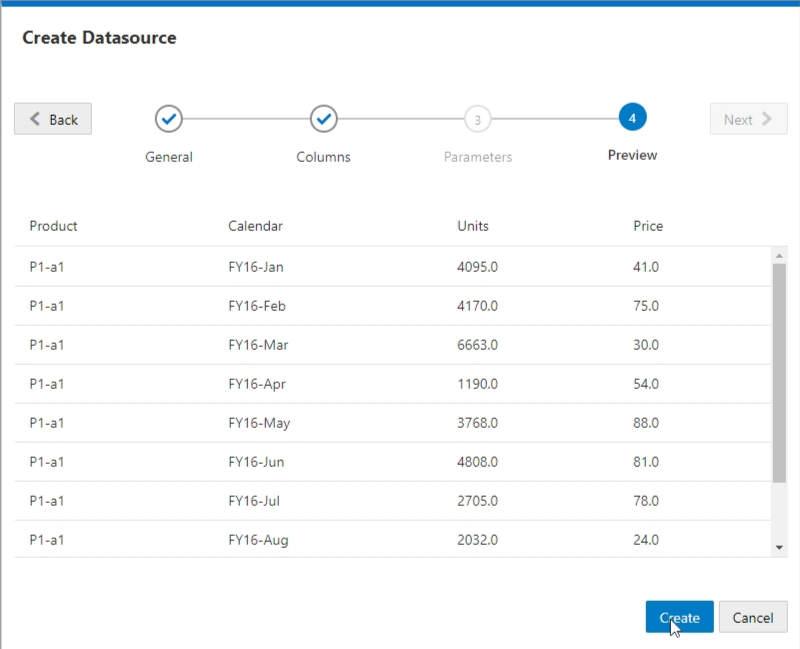
Finally I was prompted with a Preview of my data and I clicked Create.
image

Next I clicked on the Areas tab. From there I clicked the Add Area button and entered my Target Area using Essbase functions and member names.
I then clicked the Validate button followed by the Save and Close button.


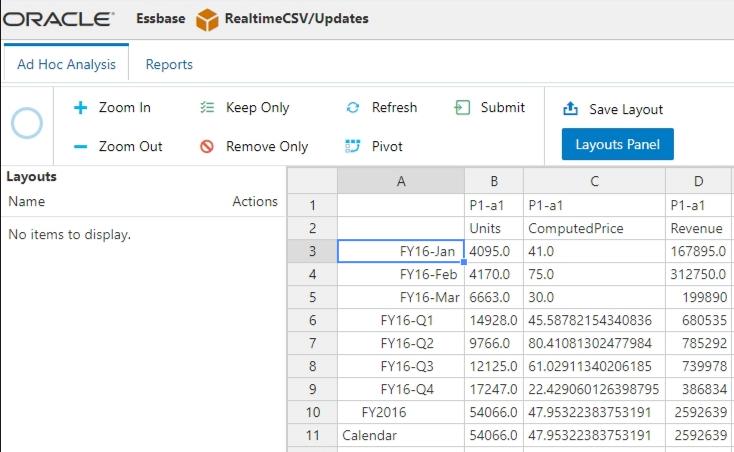
I then went to pull in some data to test the cube. The data is coming into this cube in real time.
image

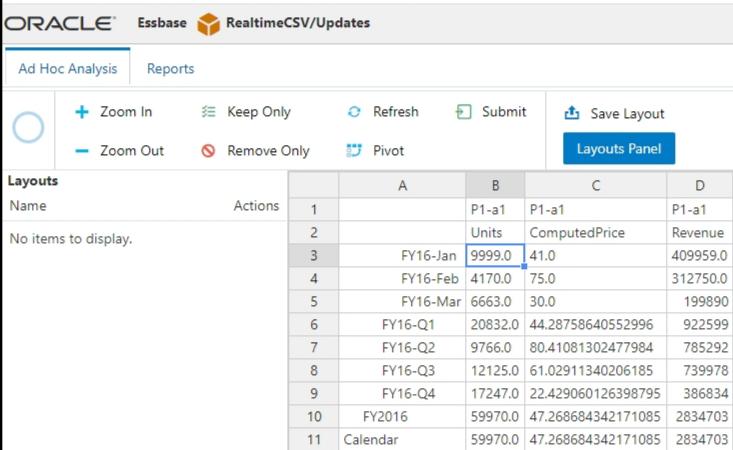
Finally, I went back and updated the csv file with some different numbers. I refreshed my data and the changes were reflected.
image


Just to prove what's going on here, I'll show you the database storage statistics. You can see that there are no blocks and no pag or ind files.


Speculating Wildly

So what does this all mean? Why would Oracle be spending time on a feature like this? All of this is speculation influenced by comments I've heard from product managers over the past year...

Oracle is a database company. They make a really powerful database that runs a significant portion of the world. Wouldn't it be really cool if they could scrap page and index files altogether and just have their relational database store all of the level 0 Essbase data? Well that's what this is. Right now. Slap hybrid calculations on top and you have real-time updates to your cube. No loads, no calcs.

It always comes down to performance. This cube is three dimensions. It's got training wheels and makes Sample Basic look complicated. I'll remain skeptical, outside of small use cases, until I see large cubes using Federated Partitions with sizable data sources. In the meantime it's another tool in the toolbox. Drop me a line if you start using it in a production environment.


Disclaimer

I urge extreme caution in trying to use Federated Partitions. Keep in mind that Oracle has probably not documented them for a reason. For now I would recommend using traditional techniques for loading data into a cube.

Monday, April 1, 2019

Collaborate 19

I wanted to let everyone know that my colleague Jason Jones will be speaking at Collaborate19 in San Antonio on April 7th and 10th. He is giving two great presentations on a couple of really current topics.

The first is Up & Running with the OAC Essbase REST API. This session will help you get started automating your Essbase cloud environment.


Abstract: Oracle's Essbase Cloud offering introduces a new and modern REST API in addition to its traditional Java API. The new REST API opens up many development, integration, and automation capabilities and differs greatly from the traditional API. This session will introduce the REST API, exploring how it's similar to and different from traditional APIs. We’ll also cover some real-world examples and how to get started with development.
Time: 3:00 PM–4:00 PM Apr 7, 2019
Location: CC 2ND FL 214C


The second is Docker & Essbase - Bring the Cloud to You. This session will teach you about using Docker to create an Essbase server. I love using Essbase in Docker. Gone are the days of lengthy and complicated Essbase installations or running slow virtual machines. I use Essbase in Docker everyday and it's improved my productivity tremendously.


Abstract: Docker is a modern technology for rapidly deploying and containerizing servers both on-premise and on the cloud. This presentation will introduce the Docker technology in a practical way, exploring interesting Essbase/EPM use cases in which Docker can be used to open up and enhance infrastructure, development, and testing in EPM organizations of any size.
Time: 4:30 PM–5:30 PM Apr 10, 2019
Location: CC 2ND FL 217D

Wednesday, March 13, 2019

OAC Next Generation Outline Extractor

The Oracle Analytics Cloud (OAC) Next Generation Outline Extractor is now available for download from the Applied OLAP website. I've also added a few tips for using it.

Background

  • For those unaware, Applied OLAP supports a free utility for extracting Essbase outlines. The utility is simple to install and use. I've used it many times over the years. One client of mine used it to extract dimensions so they could be compared to the source relational tables during UAT saving many hours of work.


Version
  • On your OAC interface page, click on your name in the top right corner. Then select About. Download the version of the Outline Extractor that corresponds to your cloud version. In this case the version is 12.2.1.1.114.


Source

  • Using the Essbase API will result in many calls to the server and could be very slow. Instead, on the Input Source choose "Extract and Process MaxL Outline XML".


Connection
  • When making a connection, use the URL that you use in your browser to connect to the OAC interface. After the 'essbase' part of the URL place '/japi' just like you see below. Then enter your Username and Password.


As always, let us know if you have any issues at Support@AppliedOlap.com.