Wednesday, September 2, 2015

Which Is Faster -- a Substitution Variable or a Data Value?

The other day on Network 54 someone asked how they could get substitution variables updated in a member formula without unloading and reloading the database. Well, it's not possible. Updates to substitution variables are immediate for many things but member formulas in an outline are not one of them. DanP chimed in with another option that I had completely forgotten about: load the substitution variable value into a database intersection. Brilliant!

Which got me to thinking, which performs better in an ASO member formula -- a sub var or a data value?

I've Been Here Before

I've worked for several financial institutions over the years and they often have rigid SOX requirements. One common need is for the user to have easy access to some time stamp telling them how "fresh" the data is. This can be accomplished in a number of ways -- a member alias set to a time stamp, a sub var and a member formula or a data value loaded directly into the database.

The first one doesn't require any special tricks because a member alias is in plain text. The second two require setting the sub var or data value to the Epoch (number of seconds elapsed since 1/1/1970). If you can get that number into Excel, you just need to apply a date format. You can even use the Smart View HsGetValue() function to grab the member value and format it as you desire in the sheet header or footer.

The catch is that this gets trickier to do if the data is updated during daily loads. You've got to stop and start the database (or run a restructure) in order to get that sub var refreshed. That's no good if you've got a heavily used system. Users don't like to get kicked out while they're reporting. So you only need to update the data value and have the member formula reference the intersection you're loading to. I would go into more detail on this solution now but this post really isn't about showing users a time stamp (let me know if there's interest and I'll do a full write-up on the subject). Anyway...

So Which is Faster?


If I'm designing purely for performance, which do I choose? Either. I tried performing very large queries that required the formula to be queried many times and they were nearly equivalent. In MDX on the server they were exactly equivalent over 10 runs. In large pulls through Smart View they were both in the same range -- between 2.5 and 3.1 seconds over the course of 10 queries each.

Tuesday, September 1, 2015

ASO Restructure Performance

According to the Essbase Tech Ref, the RESTRUCTURETHREADS setting does not apply to ASO. But if I watch the CPU usage of the ESSSVR process on Linux during ASO restructures it often goes above 100% -- I've seen it over 1000% which means that 10 cores should be working to capacity. So I'm going to test a simple question today. Does setting RESTRUCTURETHREADS above 1 improve ASO restructure performance on machines with more than one core?

This is a very straightforward test. I've got an ASO cube with about 1GB of input level data.

The Test


  1. Make a copy of the database.
  2. Validate that there is no RESTRUCTURETHREADS setting in the essbase.cfg file.
  3. Add a member to the accounts dimension and watch the CPU usage during the restructure.
  4. Record the elapsed time of the restructure.
  5. Validate that RESTRUCTURETHREADS is set to 4 in the essbase.cfg file.
  6. Restart the Essbase server.
  7. Add a member to the accounts dimension and watch the CPU usage during the restructure.
  8. Record the elapsed time of the restructure.

The Results

Elapsed time without RESTRUCTURETHREADS setting: 70.97s
Elapsed time with RESTRUCTURETHREADS 4 setting: 68.59s

That's close enough to call it even. I watched the CPU usage during the process and it was similar each time. It spiked to 200% for a good portion of the restructure. So what's going on? I'm not exactly sure but it looks like ASO restructures are multi-threaded and there's no setting to control how many threads to give the process. I can't find any documentation about it. If you do, let me know.

Monday, August 31, 2015

MDX Monday - Running MDX in Smart View

I've been a bit rough on Oracle for their MDX output -- I think with good reason. Trying to use it in a production batch environment is challenging. But there is some good news. Most of us have a tool at our disposal that gives beautiful MDX output: Smart View!

Simply right click on a connected database in the Connections Panel and select Execute MDX.


Then paste your query into the dialog box and click Execute. There's no need to include the database name specification or the semi-colon.


Here are the results. I got a neatly formatted Excel sheet and Smart View even put the where clause members into my POV! Very nice.


What happens when I use the calculated columns query from this post?


It works! Unfortunately you lose the calculated fields when you refresh the sheet.


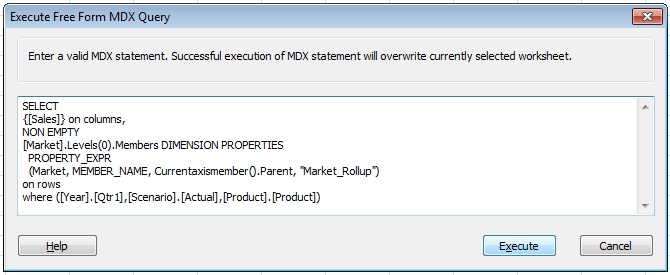
It would be great if we could print member properties too. If we could do that, then we could do things like export dimensions in a parent child format directly into Excel. Let's try it. (This is the first query in the post with a PROPERTY_EXPR addition which should print each Market member's parent.)


<sad face> Smart View appears to ignore the properties returned in an MDX query. We don't get an error but we also don't get what we want. Hopefully there will be a future enhancement to Smart View that will add this functionality.

Friday, August 28, 2015

Essbase Crashes

Welcome to laid back Friday. I want to talk a little bit about Essbase crashes today. Since I started working with Essbase in 1998 I've experienced many Essbase agent and application crashes along with a fair share of agent hangs. I've spent countless days troubleshooting the problems, searching logs, trying to figure out which user was the last to perform an action in an application with the hope that I could call them and find out what they were doing just before the problem occurred. The burden of proof with support, whether it be Arbor, Hyperion or Oracle has always been on the customer. I'd have to figure out exactly what to do to replicate the problem -- only then could I feel confident that they'd call the issue a bug and address the problem. Better yet, if I could reproduce the problem in Sample.Basic, then I wouldn't have to send them my outline or data.

Flash forward a decade and I still see seemingly random crashes and hangs. I still search through the logs but mostly there's nothing I can do. Maybe play with some thread settings or increase a cache here or there. I feel a bit powerless. I'm sure others of you are in a similar boat. I don't have much advice to share other than, keep on doing your due diligence. Check the logs, talk to users when applicable and open tickets with Oracle. I will say that the crashes and hangs are few and far between compared to the Essbase 6 and prior days.

Troubleshooting Guide

This brings me to a recently released Oracle document that helps guide you when you do experience a crash. It's available HERE on the Oracle Suport Website which does require a login.

One section in the document is about the rda.sh/rda.cmd script (Oracle Remote Diagnostics Agent) which will zip up a bunch of your server information for easy sending to Oracle Support.

Process Monitor

In most of my Essbase server environments I've had a script that runs regularly throughout the day which will check if the Essbase server is responsive. If not, it will send me an email (or page in the old days). I'd recommend having some type of process monitor running as it's better to find out about an issue and start working on it before the users start calling.